Entities
Names follow the integration's Language setting (or Home Assistant's system language).
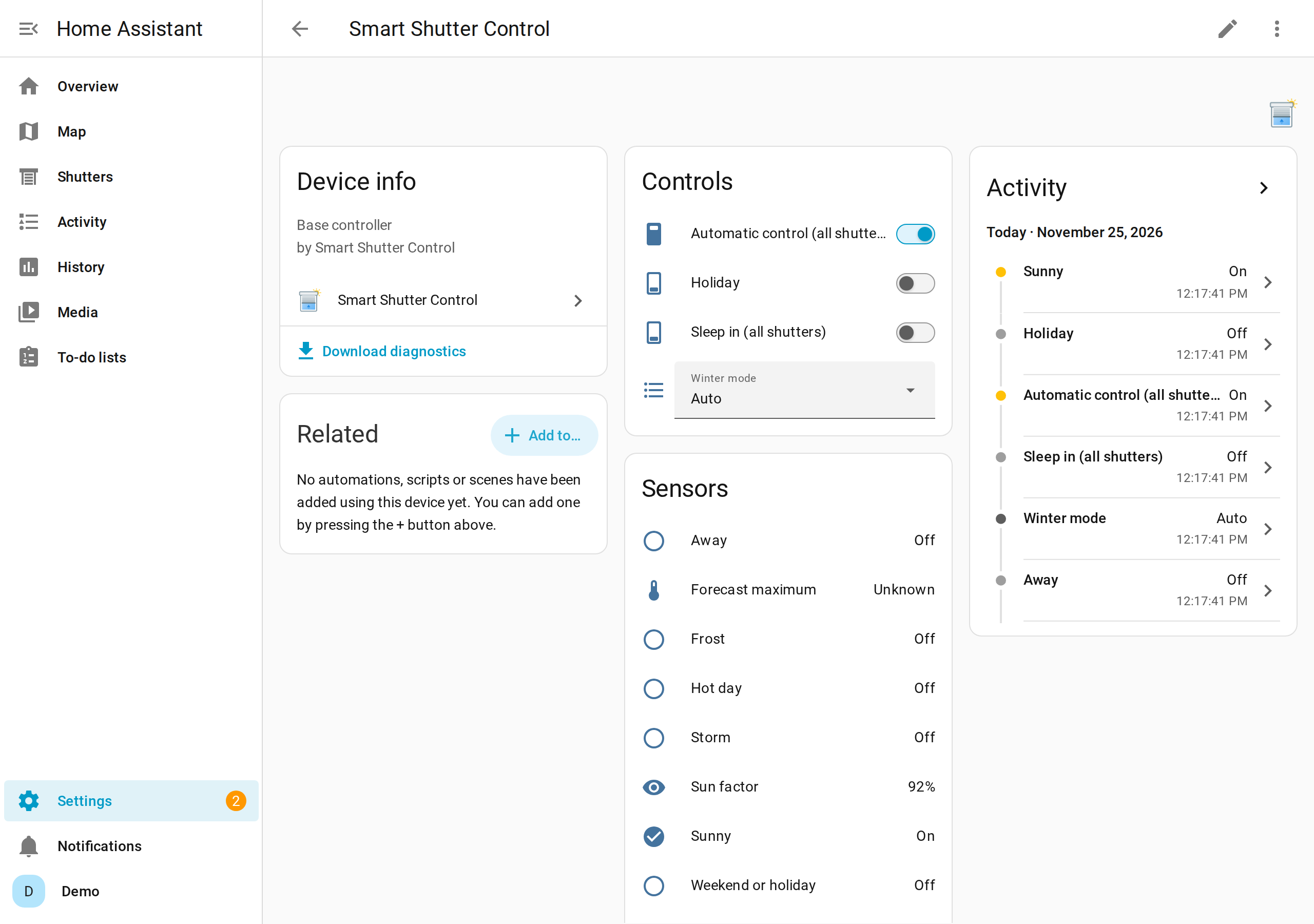
Base controller
| Entity | Shows or does |
|---|---|
| sensor Sun factor | PV power or illuminance as % of its learned clear-sky value for this position of the sun; attributes source (learned, pv_peak, pv_peak_weather, lux_learned, lux_limit, weather, geometry), sun_source, weather, cloud_coverage (%, from the weather entity, for the card), lux, sun_azimuth, sun_elevation, learned_days (days with data for the current position of the sun) and learned_days_needed (7: from then on source is learned) |
| sensor Forecast maximum | today's maximum temperature from the weather entity's daily forecast; attribute date |
| binary_sensor Sunny | sun factor above the threshold (with hysteresis) |
| binary_sensor Hot day | today's forecast maximum reaches the base hot-day limit; attributes forecast_max, limit |
| binary_sensor Weekend or holiday | today uses the weekend times; attribute holiday (its name) |
| binary_sensor Storm | storm (see How it works); attributes source (wind or gust), value, since, until, wind, gust (km/h) |
| binary_sensor Frost | frost: no automatic moves; attribute since |
| binary_sensor Winter | winter mode active; attributes mean_24h, mode |
| binary_sensor Away | on while the house counts as away: nobody home for the Away after time, or holiday; attribute since (when it became away; empty when home). No device class, as Presence would mean the opposite |
| switch Holiday | on: holiday mode. The house counts as away at once and the schedule times shift at random each day. Only you or an automation turn it on; the integration never does. Kept across restarts |
| select Winter mode | Auto (by the 24-hour mean), On, Off |
| switch Sleep in (all shutters) | turns sleep-in on or off for every shutter |
| switch Automatic control (all shutters) | off: no shutter moves by itself, not even in a storm; manual operation still works. On again: every shutter goes to its wanted position at once. The shutters' own Automatic switches keep their state |
Each shutter
| Entity | Shows or does |
|---|---|
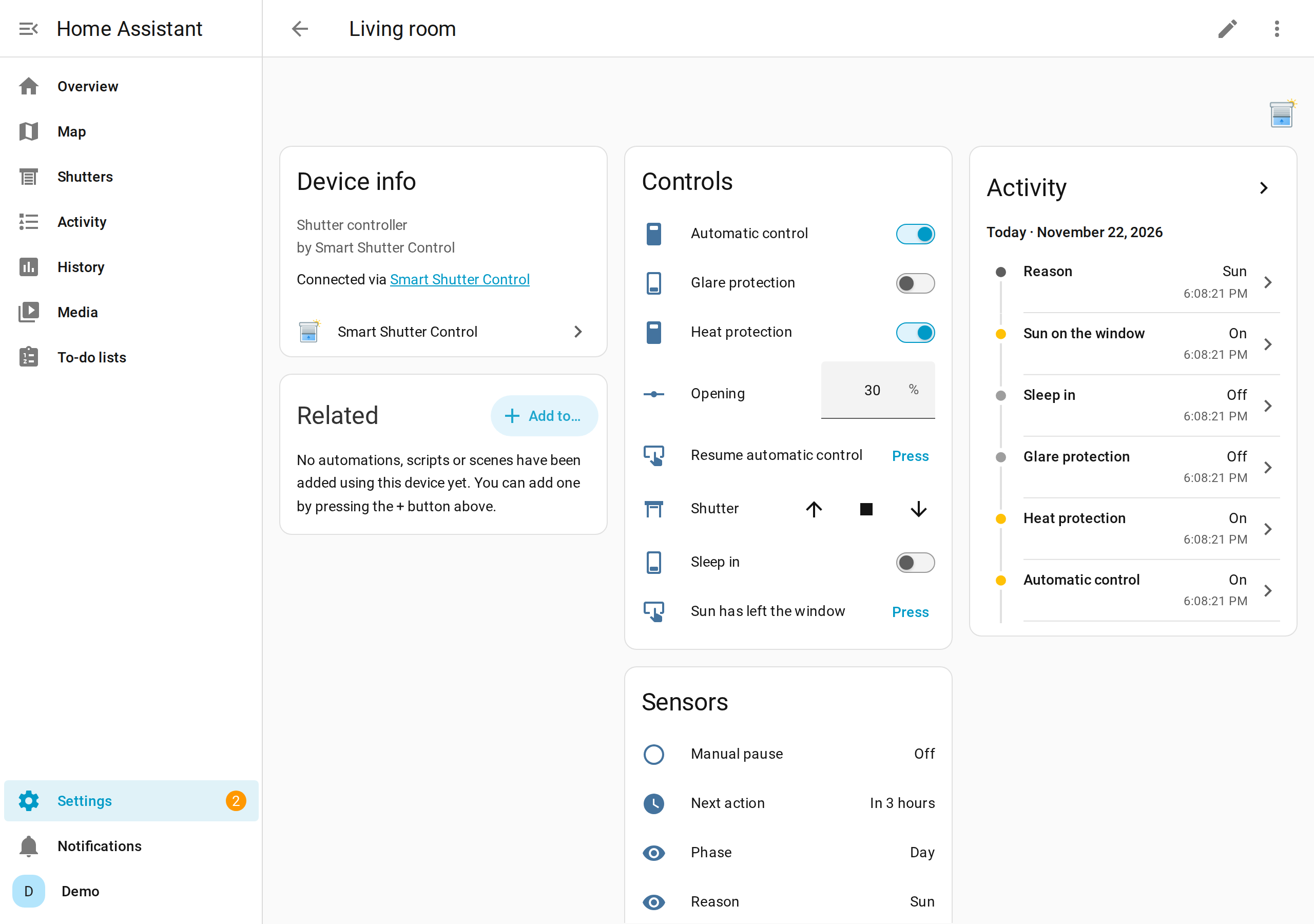
| cover Shutter | the real (calibrated) position; open, close, stop and set position act as a manual action. Opening/closing while it moves. Attributes module_position, direction, calibrated, slit, physical_cover (the entity id of the cover it moves) |
| number Opening | the real opening in %; setting it moves the shutter there (manual, ignores the maximum position) |
| number Maximum position | automatic control never opens the shutter further |
| number Heat protection position | position during heat protection |
| number Glare position | position during glare protection |
| number Glare from | sun factor (%) from which the sun counts as bright for glare protection |
| switch Automatic control | off: the integration does not move this shutter; on: it moves to the wanted position at once |
| switch Heat protection | heat protection for this shutter |
| switch Glare protection | glare protection for this shutter (off by default) |
| switch Sleep in | stays closed in the coming slit and day phases; ends on a manual action or at Sleep in until. Switched on after that time has passed today, it is for tomorrow. Survives a restart |
| binary_sensor Stuck (diagnostic) | on when a move did not arrive, also not after a second try; attributes target, position (module positions). A repair issue says the same; both clear at the next move that arrives (see How it works) |
| select Lock | None, Hold, Force open or Force closed: shows the shutter's lock and sets one without an end time; attribute until (the end time of a lock set with a duration, otherwise empty). See Locks and the action |
| button Resume automatic control | ends a manual pause and a lock, and moves the shutter to the wanted position |
| button Sun has left the window | records where the sun leaves the window now as a point of its horizon |
| sensor Reason | why the shutter is where it is: idle, automatic control off, automatic control paused (all shutters), manual, calibrating, sun, schedule, sleep in, storm, frost, heat limit, cold limit, winter, glare, locked, lockout, ventilation. Attributes target_position, max_position, language, decision (what every rule said, see How it works) |
| sensor Next action | time of the next phase change; attributes phase, position, following (the two after it), overrides |
| sensor Phase | night, slit, day or dusk |
| sensor State | closed, slit (gaps open, bar on the sill), partly open, open; attributes opening, module_position |
| sensor Calibration (diagnostic) | calibrated or not; the points, the model and the fit per direction |
| binary_sensor Sun on the window | the sun is in front of the window and not blocked (geometry only); attributes phase and glare_phase (the state of heat and glare protection: open, pending, shading or leaving), window_azimuth, window_tilt, incidence, shading_from_depth (with the room fields), horizon (the lowest elevation in the sun's current direction, with a horizon); with a facade light sensor also sunny, sun_factor, lux, source |
| binary_sensor Manual pause | automatic control is paused after a manual action; attributes since, until, source |
The decision trace includes a contacts line while an opened or tilted contact applies a lockout or ventilation floor, and while it is holding for one minute after closing.
Settings and entities. Maximum position, Heat protection position, Glare position, Glare from and the switches Heat protection and Glare protection start with the value from the shutter's Settings (Automatic control starts on). After you change the entity, its value is kept; changing the field in Settings later does not overwrite it. Example: Maximum position is 100 % in Settings; you set the number to 80 %; a later Settings change to 90 % leaves the number at 80 %. Set it on the entity.