How it works
Every minute, and whenever an input changes, the integration decides for each shutter where it should be, and moves it only when that changes.
Rules and priorities
Each rule may propose a position. The first proposal by priority wins; caps can lower it; a final proposal is not changed by lower rules.
| Priority | Rule | Proposes |
|---|---|---|
| 10 | storm | fully open or fully closed (final) |
| 11 | frost | do not move (final) |
| 12 | lock | hold, fully open or fully closed, as set by an automation (final) |
| 15 | temperature limits | closed above Close above or below Close below (final) |
| 20 | manual pause | leave the shutter where it was put (final) |
| 30 | sleep-in | closed during the slit and day phases |
| 40 | heat protection | at most the shading position (cap) |
| 41 | glare protection | at most the glare position (cap) |
| 50 | winter | closed all day in severe cold; at dusk, never raise a closed shutter (cap) |
| 60 | schedule | the position of the current phase |
With the switch Automatic control (all shutters) off, no rule is asked at all (storm included): the Reason is paused and nothing moves by itself.
Afterwards the maximum position limits every automatic target (except fully closing). The sensor
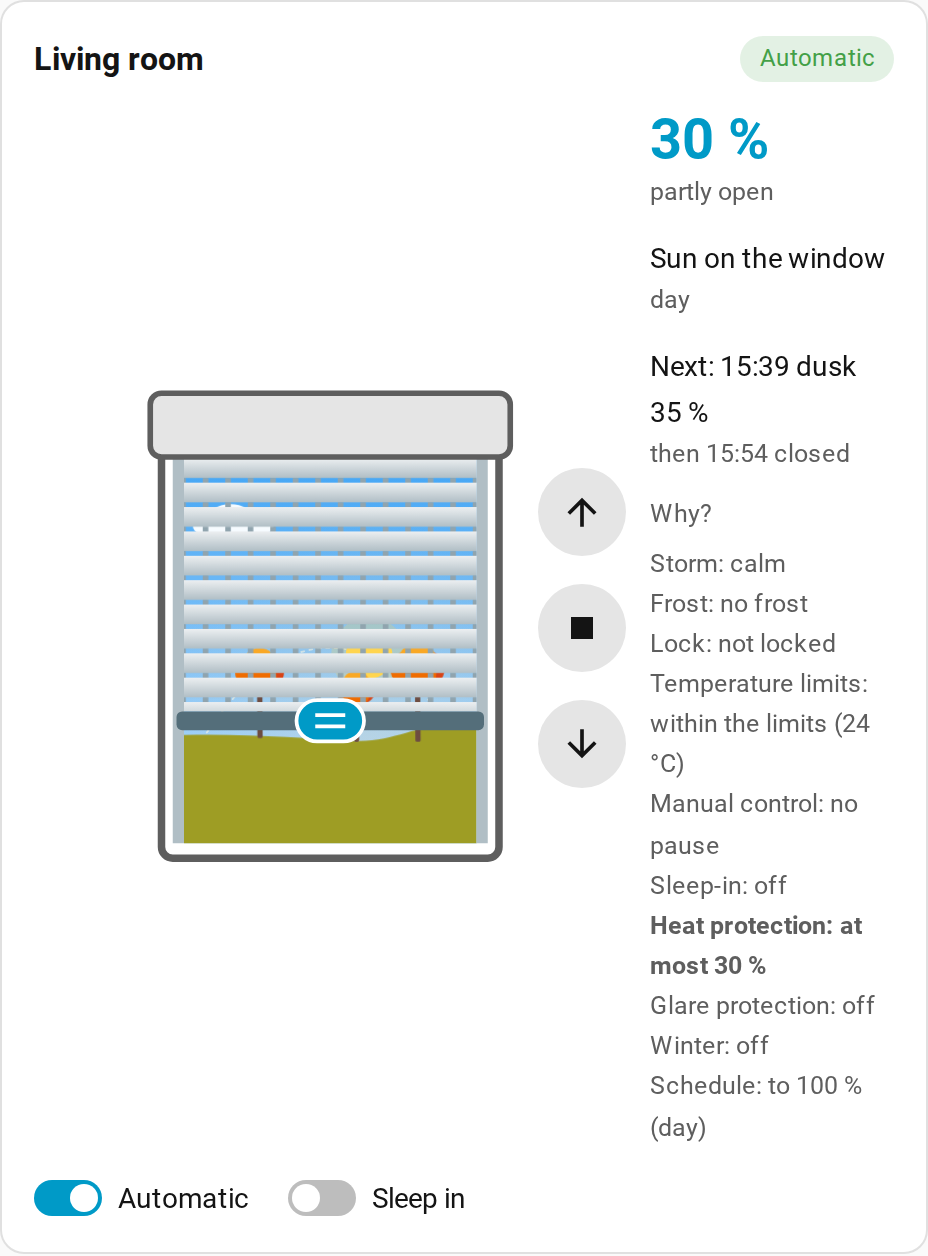
Reason says which rule decided; its attribute decision lists what every rule said, in priority order:
the position it proposed (target, cap or final), whether that one decided (applied), or why it
proposed nothing (why with values), for example:
- {rule: heat, priority: 40, result: none, why: too_cold, values: {outdoor: 9.5, limit: 22}}
- {rule: glare, priority: 41, result: cap, position: 40, applied: true, why: bright,
   values: {factor: 100, limit: 55}}
Codes: off, night, below_horizon, above_overhang, not_facing (the sun is not in front of the
window), not_sunny, too_cold, waiting / leaving (seconds until the delay ends), bright /
not_bright (sun factor against Glare from), not_day, phase, calm, no_frost, within_limits,
no_pause, not_cold, locked / unlocked (the lock rule), and for the door floors (listed as
contacts, before all rules) opened, opened_hold, tilted, tilted_hold and contacts_closed. The card shows the list under Why?. The attribute is not recorded in the
history (it changes on every evaluation).
Moves only at changes. The schedule's target is sent when a phase starts, when a setting changes, or when a higher rule ends. A shutter moved in the middle of a phase is left there until the next phase.
Which rule wins (examples)
The rules are asked from the top; the first one with a target decides, caps only lower it. cover.living_room
has Maximum position 100 %, Heat protection position 30 %, Glare position 40 %. Evening 22:00 is night
(target 0 %), the day phase wants 100 %.
| Situation | Proposals | Result | Reason |
|---|---|---|---|
| Day, sunny and 30 °C, sun on the window | heat: cap 30 %, schedule: 100 % | 30 % | heat protection |
| Same, and bright sun (glare 40 %) | heat cap 30 %, glare cap 40 % | 30 %: the lowest cap | heat protection |
| Same, and a storm (mode nearest) | storm (final): the others want 30 %, below 50 → closed end | 0 % | storm |
| Storm, and the others want 100 % (no sun) | storm: 100 is at least 50 → open end | 100 % | storm |
| You press the wall switch at 10:00 in the middle of a heat phase | manual pause (final) | stays where you put it until the next phase | manual |
| 10:00, lock Force open set by an automation, sunny and hot | lock (final) | 100 % | locked |
| Same lock, and frost | frost (final, comes first) | not moved | frost |
| Close below 5 °C, outdoor 3 °C, you open the shutter by hand | temperature limits (15) before manual (20) | closed again within seconds | temperature limits |
| Day, no sun, 15 °C, sleep-in active | sleep-in 0 % | 0 % until the sleep-in time | sleep-in |
| Day, heat cap 30 %, Maximum position 80 % | heat cap 30 %; the maximum only limits upward | 30 % | heat protection |
| Day wants 100 %, Maximum position 80 % | schedule 100 % | 80 % | schedule |
| Door open, Lockout position 100 %, heat cap 30 % | floor after the rules | 100 % | lockout |
| Window tilted, Ventilation position 50 %, heat cap 30 % | floor after the rules raises 30 → 50 | 50 % | ventilation |
A floor from a contact only raises: with the shutter at 30 % and a ventilation position of 20 %, nothing moves. A cap only lowers: a shutter already at 20 % is not raised to 30 % by heat protection.
flowchart LR
  I["inputs: time, sun, PV or lux, temperatures, wind"] --> R["rules by priority"]
  R --> L["maximum position"]
  L --> C["calibration: real → module position"]
  C --> M["cover.set_cover_position, only when the target changes;<br/>fully open/closed by cover.open_cover / close_cover"]
The day of a shutter
stateDiagram-v2
    [*] --> Night
    Night --> Slit: slit time (weekday or weekend)
    Slit --> Day: open time
    Night --> Day: open time (no slit phase)
    Day --> Dusk: sunset + dusk minutes
    Dusk --> Night: sunset + close minutes, within not before / not after
    Day --> Night: (no dusk phase)
Weekend days and holidays use the weekend times. With Not before sunrise the morning waits for the sun. Sunrise and sunset are computed from your Home Assistant location.
Sun on the window
The integration computes the sun's position (NOAA algorithm, about 0.1°) and the angle of incidence i
between the sun and the window's outward normal:
cos i = sin α · cos β + cos α · sin β · cos(γ − A)
with sun elevation α, sun azimuth γ, window direction A and window tilt β. The sun is on the
window when it is above the horizon, between the lowest and highest sun elevation of the shutter, and
i is below the largest angle of incidence (85°).
Horizon. Buildings and trees block a low sun at different heights in different directions. Press the button Sun has left the window (on the shutter's device, or in the card while heat or glare protection has lowered the shutter) at the moment the sun disappears behind something: the sun's current direction and elevation become a point of the window's horizon, and the sun is off the window at once. A point within 3° of direction replaces an older one. Between points the horizon is interpolated; the outermost points hold 15° further; elsewhere only Lowest sun elevation applies. The higher of the two counts. View and edit the points under Reconfigure → Horizon.
Is it sunny?
The base controller uses one sun source: PV power or light sensors (lux), never both.
Both are a direct measure of sunshine, but their clear-sky value depends on the panels or on where the sensor is. The integration learns it: the sky is divided in cells of sun position (10° × 5°), and for each cell it keeps the high (95th percentile) daily value of the last 30 days. The sun factor is the current value as a share of that reference. Sunny from 60 %, no longer sunny below 45 %.
Until a cell has 7 days of history:
| Sun source | Then |
|---|---|
| PV power | a rough clear-sky curve from the PV peak power, if set |
| Light sensors | sunny from a fixed limit (30 000 lx), not sunny below 80 % of it |
The rough PV curve uses the sun's angle of incidence on the panels (Panel tilt and Panel direction), so a
low winter sun on tilted panels is expected to give much more than on flat ones. It only models direct
sunlight; at a low sun most PV power is diffuse light, so the curve never drops below its value for flat
panels with the sun at 10°. While the reference is young the weather entity's condition takes part: below
10° it decides (sunny or partlycloudy: sunny), and from 10° a sky that is not sunny (cloudy, rainy,
fog, …) vetoes bright sun. The factor is still shown; source is then pv_peak_weather. A grey day
therefore does not count as bright sun. The sun factor's attributes
learned_days and learned_days_needed show how far the current cell is learned.
Without values (or without a sun source) it uses the weather entity's condition, and otherwise geometry only.
Learning (the first weeks)
The integration trains itself on your installation: it does not know beforehand how much PV power or light your sensors give in a clear sky. It learns that from the values it sees, per cell of the sky.
- A cell is trusted after 7 days with data. A cell only gets data while the sun is in it, so the noon cells are learned first, the early morning and late evening cells later, and the positions of the sun of another season only in that season: the learning goes on through the year.
- Each cell keeps the last 30 days, so the reference follows the seasons, dirty or cleaned panels, a tree that grew or was cut, or extra panels.
- Until a cell is learned, the integration uses the rough curve from PV peak power (or the fixed lux limit)
and, from 10° up, the weather entity's condition (see above). The sensor Sun factor shows which: attribute
sourceispv_peakorpv_peak_weather(light sensors:lux_limit) while learning,learned(light sensors:lux_learned) after;learned_daysandlearned_days_neededshow how far the current cell is. - The winter mode's 24-hour mean outdoor temperature starts at installation: in the first day it covers the hours since then.
What to do during learning:
- Enter the PV peak power of the panels (see Configuration), the Panel tilt and the Panel direction, and a weather entity: the better the rough curve, the better the first weeks.
- Do not tune Sunny from or Glare from on what happens in the first week: look again once
sourceislearnedfor the times of day that matter. - Nothing is lost on an update or restart: the learned values are stored. Removing the base controller starts the learning again.
Example: installed on 1 March, cover.living_room faces south. The cells around noon have their 7 days by
about 8 March. A morning cell that the sun passes for half an hour a day on clear days also has 7 days of data
by then. The integration counts days with data, not sunny days: grey days hardly lower the reference, because
it is the high (95th percentile) value of the days. A cell learned in a week without any clear sky starts too
low and corrects itself on the next clear days. The sun stands higher every week in spring, so in May the
noon sun is in cells it never was in March: those learn in May.
Light sensors: the highest of the base controller's sensors counts. A shutter can have its own facade light sensor; that sensor then decides for that shutter, with its own learned reference. Many motion sensors measure only up to a few thousand lux and cannot tell sun from bright cloud: the sources page shows each sensor's highest value of the last 30 days.
Sun factor and glare threshold: examples
Learned reference (PV). sensor.pv_power reached 4 000 W on the clearest days around this sun position
(the reference). Then:
sensor.pv_power |
Sun factor | Sunny? |
|---|---|---|
| 1 600 W | 40 % | no |
| 2 400 W | 60 % | yes, from here |
| 2 000 W | 50 % | still yes (the sunny state is kept down to 45 %) |
| 1 700 W | 42 % | no, below 45 % (1 800 W) |
| 2 800 W | 70 % | yes; with Glare from 70 % glare protection starts |
| 2 200 W | 55 % | still glare (it holds until 15 points below Glare from) |
| 2 000 W | 50 % | glare ends |
Young reference, PV peak power. With 5 kWp, panels at 35° facing south and the sun at elevation 55° due south, the sun is straight onto the panels: the rough curve expects 0.8 × 5 000 W = 4 000 W. Sunny from 2 400 W. A grey sky from the weather entity still vetoes it from 10° elevation up.
Young reference, light sensor. Fixed limit 30 000 lx corresponds to a reference of 50 000 lx. 35 000 lx is 70 %, so it just reaches Glare from 70 %; sunny from 30 000 lx, not sunny below 24 000 lx.
Raise Glare from (80 %) if the shutter lowers for light that does not bother you; lower it (50 %) to react earlier.
Heat protection
When the sun is on the window, it is sunny, and it is warm (outdoor or room temperature at or above the limit), the shutter goes down to its heat protection position after 5 minutes. It goes up again 20 minutes after one of these stops, or at once when the sun has moved past the window. Passing clouds do not make it move up and down.
Heat protection also starts when neither an outdoor nor a room temperature is available (it counts as warm). After a restart, a shutter whose conditions already hold goes to the heat protection position at once, without the 5 minutes. Manual pause, sleep-in and lock survive a restart.
Hot day. With a weather entity, the integration reads today's maximum from its daily forecast at start (also once the weather entity is there) and every 30 minutes. When it reaches Hot day from (forecast) (28 °C; a shutter may use its own value), heat protection no longer waits for the outdoor or room temperature: on such a day the shutter goes down as soon as the sun is on the window and it is sunny, after the same 5 minutes, even on a cool morning. Empty in the base options switches this off; without a weather entity or a daily forecast nothing changes.
Shading position from the sun. With Window bottom above the floor, Window height (or the
calibration's) and Sun into the room set, heat and glare protection lower the shutter only as far as needed
to keep direct sun within that depth over the floor. For a vertical window, with sun elevation e and γ
the sun's horizontal angle to the window normal, the profile angle is tan φ = tan e / cos γ; light through
the top of an opening o above the glass's lower edge s reaches (s + o) / tan φ into the room, so
o = depth · tan φ − s position = 100 · o / window height
The position is rounded down to 10 %, never below the fixed Heat protection position / Glare position, and
changes at most once per 15 minutes. A high summer sun thus leaves most of the window open; a low sun closes
it to the fixed position. A sloped window keeps the fixed position. Sun on the window shows the computed
position as shading_from_depth.
Glare protection
Heat protection needs warmth; a low winter sun can dazzle on a cold day. Glare protection (switch per shutter, off by default) lowers the shutter to its glare position after 5 minutes when:
- the sun is on this window (the same window direction, tilt, largest angle of incidence and sun elevations as heat protection), so a north window never reacts to a sun in the south;
- the sun is bright: the sun factor (PV power or light as a share of its clear-sky value, or the facade light sensor's own factor) is at or above Glare from (70 %). Without a sun factor, Sunny decides;
- it is the day phase of the schedule (not slit, dusk or night).
It does not look at the temperature and also acts in winter. Once down it stays until the sun factor is 15 points below Glare from; it goes up 20 minutes after a condition falls away, at once when the sun leaves the window or the day phase ends. With heat protection active as well, the lower position wins.
Manual operation
A position change the integration did not send is manual: a wall switch, a remote, the module's app, or the integration's own cover and Opening entities. With a motor power sensor a manual move is seen within a second. This also holds while the integration itself is moving the shutter: pressing the switch against the direction of an automatic move, or stopping it halfway (with a power sensor), counts as manual, and the integration does not send its position again. Then:
| After a manual action | Effect |
|---|---|
| pause until the next phase (default) | automatic control leaves the shutter alone until the next phase change |
| pause for a while | … for Pause after a manual action (120 min) |
| ignore | no pause |
Automatic control resumes: - when the pause ends (the shutter then moves to the wanted position); - with the button Resume automatic control, or by turning Automatic control on: the shutter moves at once; - when you move the shutter by hand to the position automatic control wants anyway.
A manual action also ends sleep-in. Storm still acts during a pause, and so do the temperature limits (they come before the pause).
Examples for cover.living_room, with the default pause until the next phase. The day phase starts at
07:00, dusk at 20:00:
| Time | What happens | Result |
|---|---|---|
| 09:00 | you close the shutter at the wall switch | paused; heat protection and schedule leave it alone |
| 15:00 | still paused, the sun is on the window and it is 30 °C | stays closed; no heat move |
| 20:00 | dusk phase begins | pause over; the shutter moves to the dusk position |
With pause for a while (120 min), the same switch at 09:00 gives control back at 11:00: the shutter then moves to what is wanted. With ignore there is no pause at all: the next evaluation (within seconds) sends the wanted position again, so the shutter goes back almost at once. Use that if you want the wall switch only to nudge, not to override.
If at 09:00 the wanted position is 100 % and you open the shutter to 100 % by hand, the pause ends at once (you did what automatic control wants).
Locks
An automation can lock a shutter with the action smart_shutter_control.set_lock, or you can
set the select Lock of the shutter. The lock is a rule of its own, and while it is on it decides for
everything below it. The modes:
| Mode | The shutter |
|---|---|
| Hold | is not moved by the integration; it stays where it is |
| Force open | goes fully open (100 %), also above the Maximum position: an explicit order, like manual operation |
| Force closed | goes fully closed (0 %) |
| None | is not locked |
Order. Storm comes first, then frost, then the lock: in a storm the shutter goes to the storm position and in frost it is not moved, whatever the lock says; the lock applies again when they end. Temperature limits, manual pause, sleep-in, heat and glare protection, winter and the schedule are not used while the lock is on.
Door floors. The lockout and ventilation floors apply after the rules (see below): a Force closed shutter is still raised to its lockout or ventilation position while the door is open or the window is tilted, and goes back to closed afterwards. The Reason is then lockout or ventilation.
How a lock ends.
- Its duration has passed (a lock set without a duration lasts until it is ended).
- The action with mode None, or the select set to None.
- Any manual action on that shutter (wall switch, remote, app, or the integration's own cover or opening entity): the lock ends and the usual manual handling follows.
- The button Resume automatic control, which ends a manual pause too.
When a lock ends, the shutter moves to what automatic control wants. A new lock replaces the one that is on, with its mode and end time. With the shutter's Automatic control switch off, or Automatic control (all shutters) off, nothing moves; the lock is kept and applies again when control is back on, unless it has expired. A lock and its end time survive a restart. While the calibration assistant runs, the lock waits.
The sensor Reason shows locked, and the decision trace says which mode.
Examples. cover.living_room has a daily schedule and heat protection:
| Automation sets | At 14:00, sunny and 30 °C | Result |
|---|---|---|
hold, 120 minutes, at 13:00 |
heat protection wants 30 % | the shutter stays where it is until 15:00; then it moves to 30 % |
force_open, no duration |
would go down | 100 % until the lock is set to none |
force_closed for 60 minutes (movie) |
– | 0 % until the hour is over; then what the rules want |
hold, then you press the wall switch |
– | the lock ends; the usual manual pause follows |
hold while the wind is over the limit |
storm decides | the shutter goes to the storm position; the hold applies again after the storm |
Lockout and ventilation
An opened contact raises the shutter at once to its lockout position and holds it there while the door or window is open. A running manual pause ends, but a manual move while open is respected. In a storm the lockout floor means fully open, and it may go above the maximum position. Opened and tilted at once use the lockout floor.
A tilted contact holds the shutter at the ventilation position, or at the slit when Ventilation position is empty. Ventilation is comfort: the maximum position and storm still apply.
Nothing moves during frost (the shutter may be frozen), during calibration, with the shutter's Automatic switch off or with the whole integration paused. A contact that is unavailable keeps its last state.
When a contact closes, the floor continues for one minute so a short walk in or out does not move the shutter. After the hold, the shutter goes to the position the rules want. The Reason is lockout or ventilation while the contact raises or holds it.
Examples. cover.living_room has Lockout position 100 %, Ventilation position 30 %, Maximum position 80 %,
and the schedule has closed it (0 %) for the night. binary_sensor.terrace_door is the opened contact,
binary_sensor.kitchen_window the tilted one:
| Moment | Result |
|---|---|
| 22:00 terrace door opens | the shutter goes to 100 % (above the maximum: safety first) |
| 22:05 door closes | stays at 100 % for 60 s, then goes to 0 % |
| 22:10 the door is closed and the window is tilted (the kitchen window's own shutter works the same) | the shutter goes to 30 % and holds there |
| 22:15 both open and tilted | 100 %: opened wins |
| in a storm with the terrace door open | 100 %: the lockout floor means fully open |
| frost, door open | not moved: the shutter may be frozen |
| Ventilation position empty | the shutter goes to the slit, the smallest gap that is above closed |
Did the move arrive?
After every position the integration sends (automatic, or through its own entities), it checks that the shutter got there: with a motor power sensor when the motor has stopped (at the earliest after 10 s, so a command that never started the motor is noticed too), without one after 1.5 × the travel time + 30 s (180 s when the travel time is not known). It asks the module for its position and accepts ±2 %. If the shutter is not there, the same command is sent once more. If that does not arrive either, the binary sensor Stuck turns on and a repair issue appears under Settings → Repairs; both clear at the next move that arrives. A manual move in between (wall switch, remote) cancels the check. Automatic control goes on as usual: being stuck does not block the next decision.
Storm
Storm while the wind speed or the gusts are at or above their limit, until 15 minutes after the last value above it. During a storm a shutter with automatic control is only fully open or fully closed, never in between (half-open slats catch the wind):
- nearest (default): the end nearest to what the other rules want now. A shutter locked open by day closes when the evening starts.
- open or closed: always that end.
- A shutter whose maximum position is below 100 % closes.
A manual move to a position in between is put back to an end within seconds; dragging in the card snaps to an end.
Frost
At or below the frost limit the shutters do not move automatically: they may be frozen to the frame. Frost ends 60 minutes after the temperature rose above the limit. Storm still acts during frost.
Winter
Winter mode is on while the time-weighted mean outdoor temperature of the last 24 hours is below 12 °C (or when the select Winter mode is On). In winter:
- at or below −5 °C a shutter stays closed all day as insulation (a manual action overrides it);
- in the evening an open shutter goes to the dusk position and then closes as usual, but a shutter that is already closed stays closed;
- with sun on the window during the day the schedule opens it for free solar heat (heat protection does not act in the cold).
Away and holiday
The house counts as away when the presence entity (a zone, person, device tracker, group or binary sensor,
set under Away and holiday) has said for Away after (15 minutes) without a break that nobody is home, or
when the switch Holiday is on. Coming home counts at once. An unknown or unavailable state counts as
home, so nothing changes when a sensor drops out. After a restart with nobody home the house counts as away
again Away after from the start. Without a presence entity the house is never away, unless it is holiday.
The binary sensor Away shows it.
While away:
- Heat protection starts at lower temperatures: both limits are Away: heat protection lower by (3 °C) lower, for every shutter, also one with its own limits. The shading position, the sun, the sunny check and the hot-day forecast limit stay as they are. Example: with the defaults a shutter shades at an outdoor temperature of 22 °C or a room temperature of 24 °C; while away it shades at 19 °C or 21 °C.
- Glare protection does nothing. A shutter lowered for glare goes back up through the usual open delay.
- Everything else (schedule, winter, storm, frost, locks, manual operation, doors and windows) is unchanged. In cool weather there is no extra shading: winter solar gain stays.
When someone comes home the usual limits apply again at the next evaluation. Heat protection then ends through its usual open delay, so a shutter does not jump up the moment the door opens.
Holiday: a lived-in house
On holiday every schedule time shifts a little, so the shutters do not open and close at exactly the same minute every day. The morning (slit and opening) shifts by one random number of minutes, the evening (dusk and closing) by another, each between −Holiday: time shift up to and +Holiday: time shift up to (30 minutes by default). The order slit → open and dusk → close is kept.
- The shifts differ per day and per shutter, but not per restart: they come from a random number made once and stored, the date and the shutter, so a restart or reload gives the same times for the same day.
- The shift comes after the usual limits, so on holiday a shutter may open up to 30 minutes before sunrise or close up to 30 minutes after the latest close time.
- Weekday and weekend times follow the calendar as usual. Sleep in is unchanged.
Example: a shutter that opens at 07:30 opens at 07:12 on one holiday day (morning shift −18) and at 07:51 on
another (+21). The evening shifts independently: with a close at 20:00 and an evening shift of +21 it closes
at 20:21. The decision trace of the schedule shows the shifts of today as shift_morning and shift_evening
(minutes). Away and holiday add no new reason: a shutter in heat protection still shows Sun.
The integration never switches Holiday on by itself; use an automation (a calendar, a long absence) if you want that.